Showing posts with label Spring Boot. Show all posts

Sunday, March 28, 2021

Kafka - An Event Streaming Platform

 Kafka With Spring - A Rapid dev guide


Overview

Apache Kafka is an event streaming platform that is used to collect, process, store, integrate data at scale.
Kafka is a distributed system consisting of servers and clients that communicate via a high-performance TCP network protocol.

In this tutorial, we will cover Spring support for Kafka. Spring ecosystem brings Spring Kafka which is a very simple and typical template programming model with a KafkaTemplate message driven POJO via @KafkaListener annotation.


Complete source code for this article can be found on GitHub.

Wait, boss !!! What is an event streaming platform ?

What are Events?

Boss !!! In our daily life, we are coming with lots of small or big events too. So guess what is it.

An event is any type of action, incident, or change that is identified or recorded by software applications. e.g a website click, a payment or a temperature reading, etc.

What is Event Streaming?

It is the digital equivalent of the human body's central nervous system. It is the practice of capturing the real-time events from sources like databases, sensors, mobile devices in the form of a stream of events; storing these event streams for later retrieval; manipulating, processing, and reacting to the event stream in real-time.

Event streaming thus ensures a continuous flow and interpretation of data so that the right information is at the right place at the right time.

Where Can we use Event Streaming?

Hey Boss!!! We can use event streaming in a large areas . Some of the areas such as :
  • Real-time processing of payments, financial transactions such as stock exchanges, insurances, banks etc.
  • Tracking and monitoring truck, cars,shipments etc. in automotive & logistics industry.
  • Capturing and analyzing sensitive data from IoT devices.
  • Monitoring patients in hospital care units and ensure timely treatment in emergencies.


How kafka is an Event Streaming Platform

Kafka combines three key capabilities which you can implement for your event-streaming ene-to-end.
  • To publish(write) and subscribe to(read)  stream of events, including contineous import/export of your data from other system.
  • To store  streams of events durably and reliably as long as you want.
  • To process streams of events as they occur or retrospectively.
and all this functionality is provided in a distributed, highly scalable,elastic,fault-tolerent and secure manner.


Kafka Topic

A topic is a log of events. Kafka's most fundamental unit of organization is the topic, which is like a table in relational datadase. You can create different topics to hold different kinds of events and different topics to hold filtered and transformed versions of the same kind of data.

$ bin/kafka-topics.sh --create --topic quickstart-events --bootstrap-server localhost:9092

Kafka Partitioning

Partitioning takes the single topic log and breaks it into multiple logs, each of which can live on a separate node in the Kafka cluster. This way, the work of storing messages, writing new messages, and processing existing messages can be split among many nodes in the cluster.

Kafka Brokers

From a physical infrastructure standpoint, Kafka is composed of a network of machines called brokers. Each broker hosts some set of partitions and handles incoming requests to write new events to those partitions or read events from them. Brokers also handle replication of partitions between each other.

Kafka Producers


The API surface of the producer library is fairly lightweight: In Java, there is a class called KafkaProducer that you use to connect to the cluster. 
There is another class called ProducerRecord that you use to hold the key-value pair you want to send to the cluster.


Kafka Consumers


Using the consumer API is similar in principle to the producer. You use a class called KafkaConsumer to connect to the cluster (passing a configuration map to specify the address of the cluster, security, and other parameters).Then you use that connection to subscribe to one or more topics. When messages are available on those topics, they come back in a collection called ConsumerRecords, which contains individual instances of messages in the form of ConsumerRecord objects. A ConsumerRecord object represents the key/value pair of a single Kafka message.

Conclusion

In this article we have covered the basic of Kafka . Keep follow for the indepth tutorial and kafka commands in next tutorials.

Complete source code for this article can be found on GitHub.

Sunday, July 26, 2020

SBA (Spring Boot Admin Server) - Monitoring and Management of Microservice

Configuring SpringBootAdmin(SBA) Server to Monitor and Manage microservices


Suppose you have multiple microservices applications and you want to manage& monitor that such as if a service goes down, an email should trigger or you will get the notification on Slack, Hipchat, or any other. You want to monitor the application health status as well. SBA(Spring Boot Admin server) is the central point where we can achieve it.

The article shows how to set up and use the Spring Boot Admin Server. The sample code of the guide can be found over on GitHub.

What is Spring Boot Admin

Spring Boot Admin server is a web application that is used to manage and monitor your spring boot applications. Each application is considered as a client and registered to the admin server. It is a Codecentric's community project whose UI is just a Vue.js application on the top of the Spring boot actuators endpoints.


Setting Up SBA

  1. Setting up Spring Boot Admin Server

First of all, we need to set up the admin server. To do this, just setup a simple spring boot project (using start.spring.io) .  Spring boot admin server is capable of running as serlet or webflux application.  So we need to add the starter accordingly.In this example, we are using  Servlet web starter.
  • Add spring boot admin starter to your dependencies
pom.xml
<dependency>
    <groupId>de.codecentric</groupId>
    <artifactId>spring-boot-admin-starter-server</artifactId>
    <version>2.3.0-SNAPSHOT</version>
</dependency>
<dependency>
    <groupId>org.springframework.boot</groupId>
    <artifactId>spring-boot-starter-web</artifactId>
</dependency>
  • Pull the spring boot admin server configuration via adding  @EnableAdminServer to your configuration.
@Configuration
@EnableAutoConfiguration
@EnableAdminServer
public class SpringBootAdminApplication {
    public static void main(String[] args) {
        SpringApplication.run(SpringBootAdminApplication.class, args);
    }
}
  1. Setting up Clients(Enable MicroserServices to register)
To register our microservice with Spring boot admin server, we need to add the following dependency to pom.xml .
  • Add spring-boot-admin-starter-client to your dependencies:
  1. pom.xml
    <dependency>
        <groupId>de.codecentric</groupId>
        <artifactId>spring-boot-admin-starter-client</artifactId>
        <version>2.3.0-SNAPSHOT</version>
    </dependency>
  • Enable the SBA Client by configuring the URL of the Spring Boot Admin Server:

application.properties
spring.boot.admin.client.url=http://localhost:8080 
management.endpoints.web.exposure.include=*  
The URL of the Spring Boot Admin Server to register at.
As with Spring Boot 2, most of the endpoints aren’t exposed via HTTP by default, we expose all of them. For production, you should carefully choose which endpoints to expose.
You should carefully consider which monitoring endpoints you want to expose as they can expose sensitive data.

SBA Dashboard


Security
The spring boot admin server exposes the sensitive data(metric endpoints) of the registered client.  Currently these are not secured and can be accessed by anyone.

To prevent this we can use spring security. 
By default spring-boot-admin-server-ui provides a login page and a logout button.
Sever :
First we will focus on securing the server application. We need to add the starter dependency of spring security and dependency of admin server login module.


pom.xml
<dependency>
    <groupId>de.codecentric</groupId>
    <artifactId>spring-boot-admin-server-ui-login</artifactId>
</dependency>
<dependency>
    <groupId>org.springframework.boot</groupId>
    <artifactId>spring-boot-starter-security</artifactId>
</dependency>

Now the security has been enabled and login interface has been added to the admin application.
Then add spring security configuration to secure the application.


@Configuration
public class WebSecurityConfig extends WebSecurityConfigurerAdapter {

    @Override
    protected void configure(HttpSecurity http) throws Exception {

        http
            .formLogin()
            .loginPage("/login")
            .permitAll();
        http
            .logout().logoutUrl("/logout").permitAll();
        http.csrf()
            .ignoringAntMatchers("/actuator/**", "/instances/**", "/logout");
        http
            .authorizeRequests()
            .antMatchers("/**/*.css", "/assets/**", "/third-party/**", "/logout", "/login")
            .permitAll();
        http
            .authorizeRequests()
            .anyRequest()
            .authenticated();
        http.httpBasic(); // Activate Http basic Auth for the server
    }
}

You will also need to add an initial user to access the pages.Add the following to application.properties:
application.properties
spring.security.user.name=admin 
spring.security.user.password=test

Clients :

To make client registerable, we need to provide these credentials in the application.properties file:
application.properties
spring.boot.admin.client.username=admin
spring.boot.admin.client.password=test
  1. Notifications(Mail, Slack, Hipchat, Let's Chat, MSTems, etc)
Spring boot admin(SBA) supports sending notifications from the admin server if something happens with our registered client state such as client service goes down etc. It supports the following notifications platforms :
  • Email
  • PagerDuty
  • OpdGenie
  • Hipchat
  • Slack
  • Let's chat
  • Microsoft Teams
  • Telegram
  • Discord
For example, we will integrate Slack and test if the Admin Server correctly sends notification about service is DOWN.
For that, you just need to let the admin server know about the slack channel.
spring.boot.admin.notify.slack.webhook-url=https://hooks.slack.com/services/<Channel_WebHook>
spring.boot.admin.notify.slack.channel=test
Now, we restart the admin server and simply shut down one of our client service. We receive a slack notification correctly.


Conclusion
In this article we discussed the simple steps that has to do , in order to monitor and manage the microservices with SBA server.Also you learnt, each spring boot application has to declare itself as a client and provide admin server url in configuration. After this admin server UI displays useful information about each of the client applications.
The sample code of this guide can be found over GitHub.

SpringBootAdmin resources

Saturday, July 11, 2020

Dynamic DataSource Routing : Spring Boot

Dynamic DataSource Routing: Spring Boot


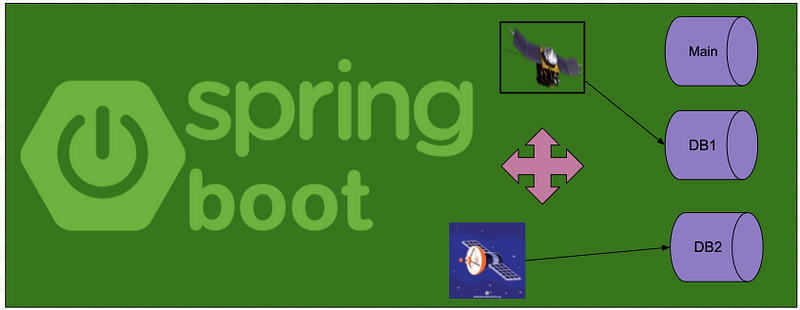
Multi data source routing(DB per satellite)

Sometimes we need to create a web application that can connect to multiple databases. We might need to connect multiple databases based on the client, customers so on.
Spring provides AbstractRoutingDataSource class which we can extend and achieve the data source routing dynamically and we can do it easily on Spring Boot.

Use cases

Sometimes for security reasons, performance, scalability, or isolation, we need data source routing such as MASTER and REPLICA DB where REPLICA DB can only be read-only.
Another use case is the real-time processing data of satellites. These are very huge volume data sets and created very frequent on an interval.
Let’s take the satellite SARAL(https://en.wikipedia.org/wiki/SARAL) and Aryabhata (https://en.wikipedia.org/wiki/Aryabhata_(satellite)) example which pushed the data on a very frequent interval of time. Suppose we have an application that can retrieve the data of the satellite and each satellite has its own database. To achieve this, we can take the help of Data source routing.


Satellite Data (ftp://scatsat1:%22%22@ftp.mosdac.gov.in/2020/JUL/L3BT/). Data copied from https://www.mosdac.gov.in/open-data

Each satellite creates a huge set of files on their FTP server (https://www.mosdac.gov.in/open-data) and based on the type, we want to retrieve the files.
In this article, we will provide the steps to configure multiple data sources dynamically using Spring Boot & JPA.
For the complete example find the code from GitHub.

Maven Dependencies

Here is the list of maven dependencies. We used MySQL Database and Spring MVC.
Find it from GitHub.


DataSource Router :  AbstractRoutingDataSource, Spring 2.0.1 introduced which acts as an intermediary. However, the real data source can be determined dynamically at run time based on a lookup key. In our example, we will use the notion of a DatabaseContext which has the following implementation. Find it from GitHub.Take a DataBaseContextHolder which is a utility class that can set the data source context dynamically which has the following implementation. Find it from GitHub.

Finally, we will define our MultiRoutingDataSource which will extend the spring provide AbstractRoutingDataSource and override the method. Find it from GitHub.
Configuring Datasources
Let’s configure the data source in the application.properties file

Data Source Configuration :
In this example, we created three (3) data source bean such as mainDataSource,arayabhatDataSource & saralDataSource which can be decided based on the type of data source requested dynamically. Find it from GitHub.


Testing :
In this example, when we will click on File Storage-Saral satellite, it will access the satellite SaralData and will navigate the satellite Saral data related file server of ftp://scatsat1:%22%22@ftp.mosdac.gov.in/ and similar to Aryabhata(But for Aryabhata satellite, we have used same FTP server with different data set for illustration purpose only).
Access files example :
Satellite Data (ftp://scatsat1:%22%22@ftp.mosdac.gov.in/2020/JUL/L3BT/). Data copied from https://www.mosdac.gov.in/open-data

Conclusion

Spring boot provides additional configuration support which we can do if we want to configure multi-data source connectivity dynamically.
For the complete example find the code from GitHub.